
Key Takeaways
- Empathize with users to build relevant and helpful mobile UIs.
- Follow a systematic UI design process to ensure intuitive user journeys.
- Use modern tools and adhere to best practices for design efficiency and effectiveness.
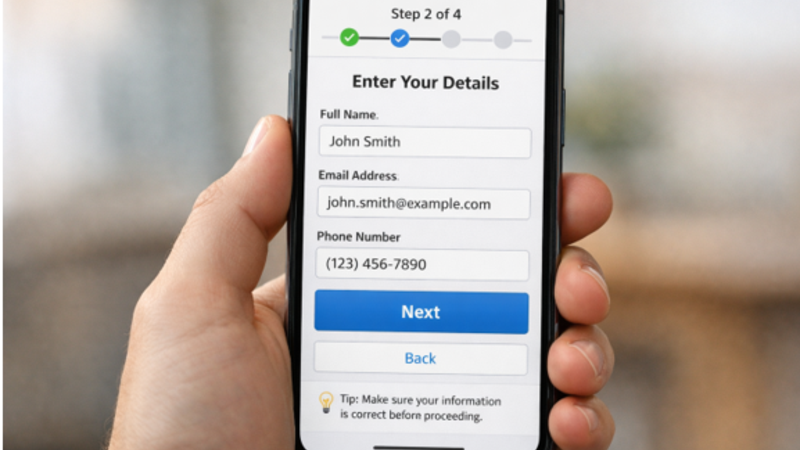
Delivering outstanding mobile applications starts with placing user experience at the center of the design process. A thoughtfully structured user interface (UI) guides users effortlessly through an app and ultimately drives engagement and satisfaction. The mobile stepper UI is just one example of the navigation components designers use to make complex processes more manageable for everyday users. Crafting such intuitive experiences requires attention to usability, accessibility, and visual consistency from the first draft to the final launch.
Whether you are new to UI design or seeking to refine your workflow, mastering user-friendly flows is crucial. Designing with empathy, testing iteratively, and keeping the user journey simple all contribute to retention and delight. When users are able to achieve their goals quickly and without frustration, they are more likely to become loyal advocates for your app.
Beginning with a solid understanding of your audience’s needs and ending with iterative improvement based on real feedback, each step in this guide builds toward creating mobile apps that resonate. By focusing on clarity in navigation, consistent visual elements, and streamlined tasks, you set your app apart in a crowded marketplace. As you put these steps into practice, remember that UI design trends evolve rapidly, and continuous learning is part of building better products.
Understanding User Needs
Designing a successful mobile UI starts with research into what users want and need from your app. User research methods such as interviews, surveys, and observation help reveal pain points and aspirations. By analyzing app analytics, you can see how users interact with current interfaces and where they encounter friction. These insights ensure your design is rooted in actual user behavior and preferences instead of assumptions or trends.
Defining Information Architecture
Once you understand your audience, the next step is to plan how information will be organized within the app. Effective Information Architecture (IA) supports users in finding what they need without unnecessary effort. Key IA activities include creating a content inventory and mapping out how features and information will be grouped. Understanding your users’ logic, known as mental models, lets you organize menus and sections in a way that feels natural to them, reducing cognitive load and boosting satisfaction.
- Content Inventory:Enumerate every planned feature, action, and piece of content.
- User Mental Models:Build structures that mimic how people already think about the app’s domain, lowering the learning curve.
If you are new to the basics of IA, Nielsen Norman Group’s guide to information architecture provides foundational expertise from one of the industry’s leading UX authorities.
Creating Wireframes and Prototypes
With a clear structure in place, designers create wireframes illustrating, at a high level, the layout and placement of elements for each app screen. Wireframes do not focus on exact style choices; instead, they depict the app’s skeletal framework. Next, prototypes bring these wireframes to life, letting designers and stakeholders interact with app flows before any code is written. Prototypes help identify usability issues early, preventing expensive changes during development and resulting in a smoother launch.
Designing the User Interface
The visual identity of your app emerges during this stage. Designers make deliberate choices about color schemes, fonts, spacing, and the size and shape of buttons and icons. Interactive elements must follow predictable patterns and respond intuitively to touch input. A consistent design language, applied across the app, results in a professional look while also reinforcing usability and trust. Make sure to adopt a mobile-first mindset, as tight screen space and touch interaction present unique challenges and opportunities.
Implementing and Testing
When the designs are finalized, development work translates the vision into a working app. It is crucial to perform multiple rounds of usability testing throughout development. Invite real users or external testers to use the app in real scenarios, identifying points of confusion, broken flows, or slowdowns. By prioritizing iterative tests early and often, your team catches small issues before they become significant usability obstacles. This leads to a more stable and reliable app experience at launch.
Iterating Based on Feedback
After releasing the app, continually gather user feedback through in-app messages, user reviews, and analytics tools. Observe how new features perform and watch for emerging pain points. Adjust workflows and refine interfaces according to what your users actually experience. Regular updates that respond to feedback help maintain user engagement and foster trust that your team listens and cares about ongoing improvement.
Best Practices for Mobile UI Design
- Simplicity:Streamline each screen, providing only what is essential for the task at hand.
- Consistency:Match interactive elements and layouts throughout the app for familiarity.
- Accessibility:Make text legible, buttons easy to tap, and navigation inclusive to users of all abilities, using standards like WCAG.
Performance: Compress assets, load resources efficiently, and track app responsiveness for a consistently smooth experience.
Conclusion
Designing effective UI flows for mobile apps is a strategic process focused on understanding your users, organizing information clearly, and fine-tuning based on authentic feedback. By employing proven design practices and modern UI elements, you deliver a product that feels effortless and intuitive to your audience. Thoughtful mobile UI design is not a one-time effort but a cycle of improvement—ensuring your app remains competitive and truly user-friendly as needs and expectations evolve.